OwnTime
Procrastination: Stop Working From the Team Task Board
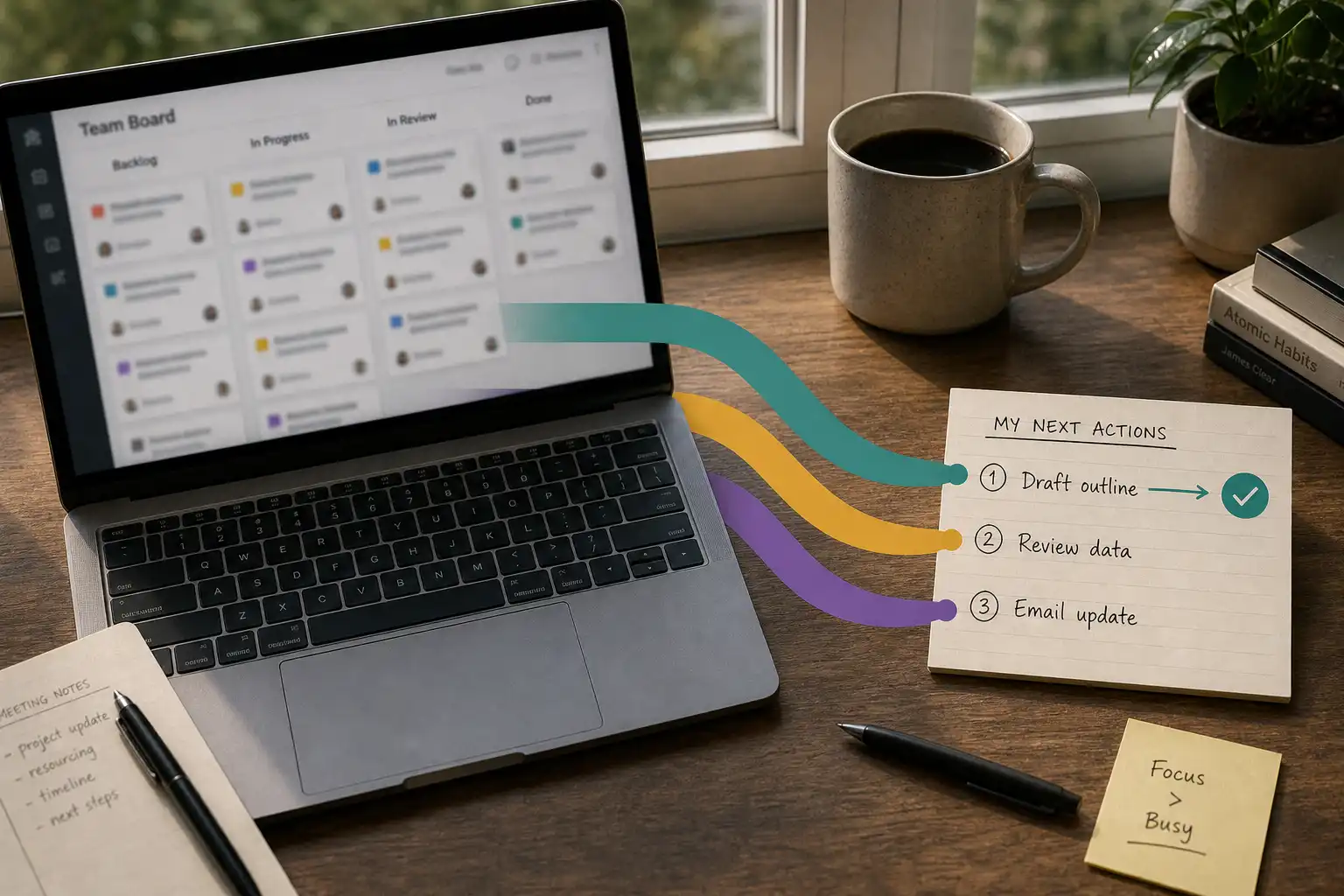
Your team board is not your next-action list
At 9:07 a.m., a project board can show 12 tickets in assorted states of urgency, two new messages, and enough status detail to burn an hour before any work moves. The board may be accurate, yet accuracy does not tell you what deserves your limited attention first.
A shared board is for coordination. It should make these things visible:
- ownership
- deadlines
- dependencies
- decisions
- project history people can trust
It is not a cockpit for deciding the next physical thing to do. Working directly from the shared board is one of the least helpful remote-work rituals, because a useful coordination system quickly becomes a menu of distractions when it also has to direct individual focus.
Remote work adds plenty of hidden friction: a missing decision, an unclear brief, a message that needs an answer, or the low-grade pressure to look available. A mixed-methods study of pandemic-era remote work identified procrastination, ineffective communication, work-home interference, and loneliness as key challenges; workload, autonomy, and social support shaped those experiences. A personal queue will not fix every workplace problem, but it can keep unclear coordination from becoming an all-day avoidance loop. Read the study
The team board should tell the team what is true. Your personal queue should tell you what to do now.
Keep one team record and make a private action queue
Keep the shared board as the source of truth, then pull out only the actions you could realistically begin today. Copying every ticket, project, and someday idea into a second system creates a maintenance job, and maintenance is suspiciously good at replacing actual work.
Each item in the private queue needs four details:
- First physical action: “Draft three questions for the client,” rather than “Client discovery.”
- Consequence: What becomes easier, safer, or unblocked once it moves.
- Handoff or deadline: Who needs it and when, if anyone does.
- Link back: The project card, document, or conversation containing the team context.
Three to five actions are enough for a work block. That small number leaves the rest of the workload safely on the team board until it is relevant, rather than demanding that your brain hold the whole backlog at once.
Rewrite work until it has a start button
“Prepare launch plan” sounds actionable, but it is a container for research, choices, writing, approvals, and likely one uncomfortable unknown. Ambiguity gives procrastination somewhere to hide, so the brain reaches for cleaner tasks such as clearing notifications or editing a status field that did not need editing.
Make the first action small enough to begin before you feel ready and meaningful enough to advance the project. Good actions start with a verb and end with an artifact, a person, or a decision.
| Vague board item | Startable action |
|---|---|
| Finish onboarding flow | List the three screens that still need copy decisions |
| Review analytics | Pull last week's activation data into one note |
| Coordinate launch | Send the designer the two unresolved launch questions |
| Fix customer issue | Reproduce the error using the account details in the ticket |
This reduces the activation energy required to enter the work; it is not busywork wearing a productivity costume. A laboratory study of precrastination found that memory load changed whether participants completed an easy subgoal sooner, even when doing so required more physical effort. That result fits a familiar pattern: people sometimes act fast to clear mental load. Read the research
Clearing a blocker is useful. Closing 10 tiny tasks while the hard, important task stays untouched is avoidance with excellent paperwork.
Use three lanes instead of one giant priority ranking
A single ranked list looks tidy until a meeting moves, a teammate needs an answer, and one task suddenly needs clarification. Sort today's queue into three lanes instead, because each lane answers a different question.
- Protect: What must move today because someone is waiting, a deadline is real, or delay creates damage?
- Advance: What one substantial action makes meaningful progress on ongoing work?
- Use the gap: What useful low-effort task fits a spare 10 or 15 minutes without pushing out the first two lanes?
The third lane matters because remote work has odd fragments of time, and few 12-minute gaps turn into deep focus. Easier tasks have a place; they just should not quietly consume the whole day.
If you use OwnTime, let it surface a short set of actions that fit your current context across work and life, then return to the team board for project detail and shared visibility. The app can reduce sorting friction, while you still decide what deserves the next block of attention.
Decide what happens when friction appears
Remote-work stalls repeat often enough that they deserve pre-decided responses. An if-then rule turns “stay focused” into something usable at the exact moment avoidance starts dressing up as planning.
Try rules like these, then adjust the wording until it sounds like something you would actually do:
- If I cannot explain a task's first action in one sentence, then I will spend 5 minutes writing questions or asking the owner for context.
- If I open chat during a focus block, then I will respond only to messages that block another person before returning to the task.
- If I am waiting for feedback, then I will update the card with what is needed and switch to one named fallback action.
- If I catch myself reorganizing the board, then I will complete one visible work action before changing task structure.
- If I finish a demanding task, then I will take a short break or choose one low-effort action from the third lane.
A team can make the chat rule easier to follow by agreeing on clearer urgency and availability signals. Remote-team interruption rules help reduce the false emergencies that keep dragging focus blocks apart.
Small rules remove a decision when your executive function is already busy. You do not need a heroic morning routine to send one clarifying question or open one document.
Match the next action to the blockage
Before calling procrastination laziness, inspect what is making the next move costly. The right response is usually specific.
| If your day looks like this | Put this in your queue | What it prevents |
|---|---|---|
| A teammate is waiting on you | The smallest deliverable or status update they need | Silent delays and anxious checking |
| The task is vague | A question list, a 5-minute research pass, or a request for a decision | Spending hours “preparing” to start |
| You have a high-focus window | One defined Advance action with notifications muted | Losing your best energy to admin |
| You only have a short gap | A useful low-effort action with a clear stop point | Defaulting to endless scrolling or inbox triage |
| A deadline moved | A quick review of what is affected, followed by one re-sequenced action | Replanning the entire week unnecessarily |
This guide does not ask for a perfectly ranked map of every responsibility in your life. Perfect priority ranking is fantasy planning; the practical job is making the next choice clearer than the distraction competing with it.
End with a handoff, not a full reset
Before signing off, update the board or relevant thread with what another person needs while you are away:
- what moved
- what is blocked
- what happens next
Keep the update brief. A clear handoff preserves trust without making constant availability the price of working remotely.
Then spend 60 seconds choosing tomorrow's Protect action and one Advance action, especially if either depends on a morning decision. Stop there, because a long nightly planning ritual can become another polished form of procrastination.
Tomorrow should begin with one small, believable action that moves the right work forward.
Related articles

Deep Work for Parents: A Flexible Focus System
7 Remote-Team Rules for Fewer Interruptions

Google Tasks vs TickTick for Group-Project Procrastination

Daytime Sleepiness: An ADHD Capacity-Planning Guide

Procrastination for Founders: Protect Personal Time With Better Starts

Sleep-Friendly Planning: Notion vs Microsoft To Do