OwnTime
Routines for Knowledge Workers: A Flexible ChatGPT System
Let routines absorb decisions instead of tightening your calendar
If a 10:00 a.m. meeting runs long, a useful routine should still tell you what to do next without making the rest of the day feel ruined. That is the standard.
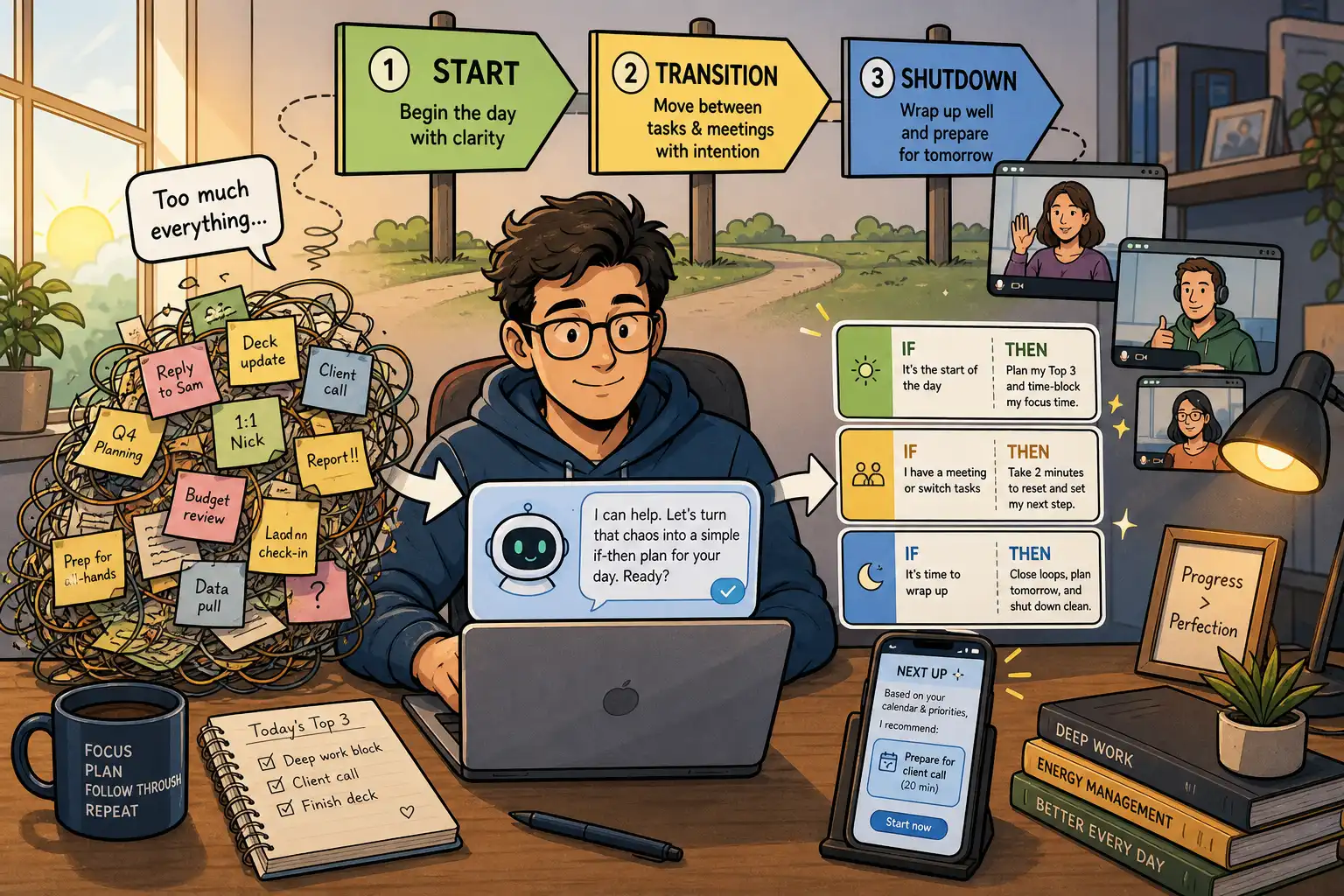
A flexible routine is a response rule tied to a moment that already happens, such as opening your laptop, leaving a call, or finishing lunch. The cue does the remembering. Knowledge work can change direction several times before noon, while these transitions usually keep repeating.
Rigid “perfect day” calendars are overhyped for overloaded professionals. They look tidy on paper, yet a small rule that survives interruptions will protect more attention than a schedule that falls apart after one urgent request.
Use cues that happen in real life
Skip the fixed-number-of-days myth about habits. Behavior becomes easier when you repeat it in a recognizable context, and the amount of repetition varies by person and by action.
A practical way to create that context is an implementation intention, an explicit if-then plan. In experiments, people who made these plans started intended actions more efficiently, including under cognitive load, according to research on implementation intentions. That is useful when your attention is already elsewhere.
An if-then sentence will not make a routine automatic overnight. It removes one small decision at the moment when decisions are most likely to get skipped.
Researchers have also compared routine-based cues with time-based cues for habit formation in a randomized trial. The distinction matters when calls, travel, client needs, or shifting priorities make a 2:00 p.m. rule unreliable; see the trial of routine-based versus time-based cue planning. Event cues give changing workdays more room to breathe.
There is also a broader case for reducing unnecessary planning. A 2024 systematic review of work-related factors and cognitive functioning points to the value of protecting cognitive capacity across working life. Capacity runs out.
Build three anchors for the workday
Start with three anchors rather than trying to install a dozen habits at once. A small system gives you enough repetition to learn what works without turning routine maintenance into another job.
| Anchor | Cue | Standard action | Minimum version when busy |
|---|---|---|---|
| Start | You open your work setup | Choose one meaningful outcome and name the first physical action | Write: “First, I will…” |
| Transition | A meeting ends or a focused block finishes | Capture follow-ups, stand up, and choose the next task | Capture one follow-up and take three breaths |
| Shutdown | You stop work or close your laptop | Record loose ends and set tomorrow’s starting task | Write tomorrow’s first task |
None of these rules needs a fixed hour, so they can work with a 7:30 a.m. start, a 10:00 a.m. start, or an unexpectedly urgent first hour. The cue matters more than the clock.
The minimum version is part of the design, not a consolation prize. It keeps the cue-action connection alive when the day gets messy.
Make the first action observable
“Get organized” leaves too much room for hesitation when your energy is low. “Write the next action for the proposal” gives you something visible to begin.
Set each anchor so it produces a result in under five minutes, even if the full task takes much longer. You can continue after that first move.
- Replace “plan the day” with “After I open my laptop, I will choose one outcome and one 20-minute starting step.”
- Replace “take better breaks” with “After a video call ends, I will stand and refill my water before deciding whether I need five quiet minutes.”
- Replace “stay on top of email” with “After lunch, I will process messages for 15 minutes, then close the inbox.”
- Replace “prepare for tomorrow” with “Before I finish work, I will capture open loops and name tomorrow’s first task.”
Use ChatGPT to draft rules, not run your day
ChatGPT works well as a drafting partner when you give it real constraints and keep the final judgment yourself. It should help you spot friction, not hand you a stricter calendar.
Before prompting, write down your recurring cues, common drift points, non-negotiable commitments, and the effort you can spare on a difficult day. Use observations rather than aspirations. Keep client information, internal documents, passwords, and personal details out of the chat.
Use this prompt for a first draft:
I am a knowledge worker with unpredictable meetings and a changing workload. Help me design three flexible work routines anchored to recurring events.
Ask me up to five questions about my recurring cues, energy patterns, work constraints, and biggest friction points. Then create a table covering the cue, if-then rule, standard version, two-minute fallback version, and what success looks like. Do not create a minute-by-minute schedule. Prioritize rules that still work when my day is disrupted.
Concrete answers produce better rules. “I often have back-to-back calls until noon” gives the model far more to work with than “I should focus better.”
Edit the result hard after you receive it. If a rule requires motivation, perfect timing, or several decisions before you can begin, simplify it until the next move is obvious.
Run a friction check before adopting anything
A routine can sound sensible and still fail in your actual environment. Check it against meetings, low energy, travel, interruptions, and vague wording before you put it into a task system.
Try this follow-up prompt:
Review these routine rules like a skeptical operations coach. Identify where each one could fail because of meetings, low energy, travel, interruptions, or unclear wording. For every risk, suggest a simpler cue or fallback action. Keep only the rules that are easy to restart after a missed day.
This is where a generic plan becomes a workable one. Originality is beside the point; low friction wins.
Put each rule where the cue can reach it
A chat transcript is a poor home for routines you need to follow next Tuesday. Put each rule somewhere you will see when the cue arrives.
A calendar reminder can work for a fixed cue, while a saved note, task view, plain-text checklist, or contextual recommendation system can work better for variable cues. The goal is to avoid searching through a giant backlog when you have 90 seconds between calls.
For example, OwnTime can hold a flexible recurring action such as “do a five-minute shutdown” and bring it forward near the end of the workday, while keeping strict appointments separate from routines that can slide. That setup is a better fit for many work habits than pretending every useful action belongs at exactly 5:00 p.m.
- Create one task for each standard routine action.
- Put the minimum version in the task note or a subtask.
- Start the wording with the cue, such as “After my last meeting…”
- Review the rule when the cue appears or during one weekly check-in.
The best location is the one you will actually open. Fancy systems are optional.
Review weekly instead of scoring every slip
Do not grade yourself every time a routine goes missing. That turns a support tool into a quiet source of guilt.
Spend 10 minutes once a week looking for patterns in what happened. Check which cue appeared reliably, where the action felt awkward, and whether the fallback version was small enough to use.
You can use ChatGPT for that review without turning it into a daily planning ritual:
Here are my routine rules and what happened this week. Help me review them without focusing on streaks. First, identify the cue that proved most reliable. Then identify the action with the most friction and suggest one small change for next week. Do not add new routines unless one should replace an existing rule.
Measure usefulness rather than perfection. If your shutdown happened three times and stopped loose tasks from following you into the evening, the routine did its job.
Make one change at most after each review. Changing four things at once makes it nearly impossible to tell what improved the system.
Avoid the traps that make routines heavier
Building a routine for every problem
A long list of rituals creates more prompts to ignore. Add a new rule only after an existing one feels stable and clearly useful.
Using the clock as your only cue
“Every day at 2:00 p.m.” can suit a protected focus block, yet it breaks easily in a meeting-heavy role. Pair time with an event cue when you can, such as after lunch or after your first client call.
Treating a skipped day as a reset
One missed cue is ordinary. Restart at the next available cue without making the action bigger to compensate.
Asking ChatGPT to remember everything
A chatbot can help you draft checklists and review notes. It should not be the sole home for commitments, recurring actions, or reminders that must appear at the right moment.
Questions about flexible work routines
Can a routine work if my meetings change every day?
Yes, when the trigger is an event rather than a particular hour. “When a meeting ends, capture follow-ups before opening another app” works whether the meeting happened at 9:00 or 3:30.
Should I use ChatGPT every morning?
Usually, no. Use it when setting up the rules and during a weekly review, then let the short rule handle daily execution because repeated replanning can become a polished form of procrastination.
What if office days and remote days need different routines?
Use different cues when the context truly changes. “When I arrive at my desk” may fit office days, while “after I make coffee” may fit remote days, and both can lead to the same one-minute prioritization action.
How long should I test a routine before changing it?
Give the rule enough real opportunities to reveal friction instead of judging it after one rough day. If the cue happens repeatedly but you keep avoiding the action, shrink the action or choose a better cue.
Are routines only for work tasks?
No. A transition rule can protect lunch, movement, preparation for family time, or a calmer evening just as effectively as it protects a project plan.
Start with the transition you lose most often
For the next seven days, choose the moment that most often sends you into drift: opening work, ending a meeting, or finishing the day. Write one if-then rule with a two-minute fallback, then keep it visible where that cue occurs.
If no transition stands out, begin with shutdown. Ending today by naming tomorrow’s first task makes the next workday easier to enter, even when the morning starts at full speed.
Related articles